


Synology – RackStation RS822RP+
- High Performance
Over 2,100/1,000 MB/s sequential read/write throughput supports stable data transfers - Easy Expansion
Scale up to 8 drives with one SynologyRX418 Expansion Unit - Flexible Connectivity
Four 1GbE ports support network failover and load balancing, with optional 10/25GbE expansions available - SSD Cache Support
Boost random IOPS performance with optional SSD cache

2103/1074 MB/s sequential read/write throughput

Scale up to 8 drives with Synology Expansion Unit RX418

Built-in 4 x 1GbE ports with 10/25 GbE expansion option

Up to 32 GB DDR4 ECC
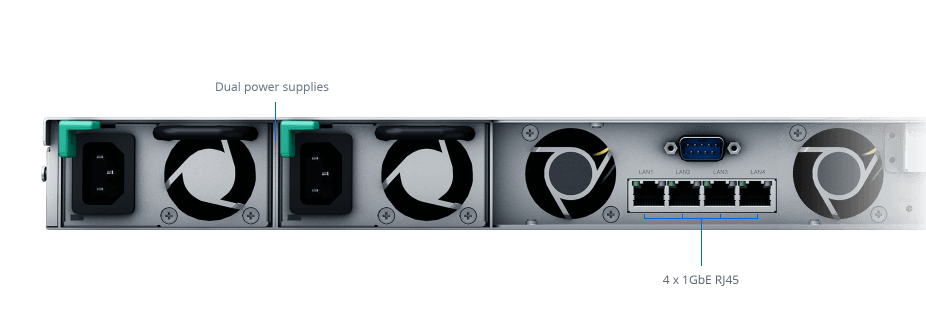
Built for reliability
RS822RP+/RS822+ comes with four Gigabit RJ-45 ports which can be bonded with Link Aggregation to enable automatic network failover and load balancing.
Two RS822RP+/RS822+ units can be paired using Synology High Availability to form a reliable active/passive server cluster, maximizing service uptime.
Furthermore, the RS822RP+ features a redundant power supply for an extra edge in service continuity.
Room for expansion
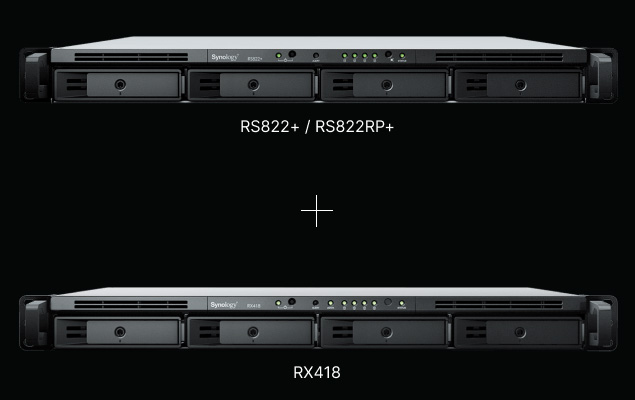
Easily adjust the RS822RP+/RS822+ to match your usage environment, whether it needs performance, faster networking, or higher storage capacity.
Storage expansion
Expand to 8 drive bays with one RX418 expansion unit.

Edge storage for distributed teams

Multi-endpoint data protection

Smart surveillance for small deployments
Edge storage for distributed teams
Provide secure and convenient multi-platform file access, sharing, and synchronization across different locations.
Private file cloud
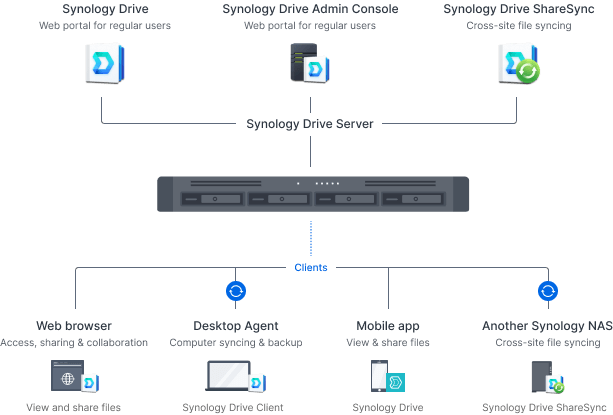
Enable effective collaboration with Synology Drive
Synology Drive provides remote data access, synchronization, on-demand file restoration, and backup via handy desktop and mobile applications.
Multi-platform support
Access personal and shared data from mobile app, desktop client, web browser, or another Synology system: Any changes you make are automatically synced to other devices as soon as they are connected.
Collaborate in real time
Integrate with Synology Office to enable concurrent editing on documents, spreadsheets, and slides, with support for conversion to and from Microsoft Word, Excel, PowerPoint, and OpenDocument files.
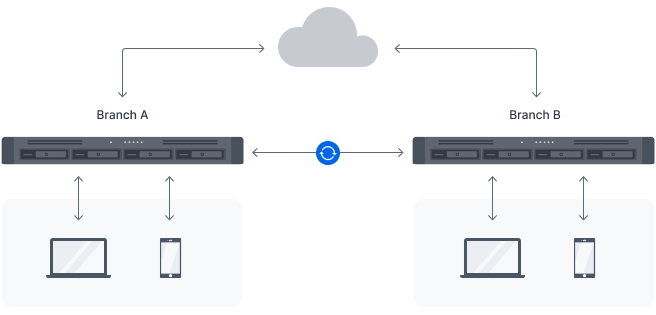
Efficient multi-site synchronization
Connect teams with Hybrid Share
Utilize Hybrid Share to store large sets of data in the cloud, leveraging the powerful bandwidth of our data centers to stream requested files to local NAS deployed at the branch offices.
Data on demand
With Hybrid Share-enabled folders, remote teams retain full access to the most up-to-date files while benefiting from reduced local storage footprint and bandwidth usage.
Cache data used locally
Frequently accessed files are kept on the local NAS, allowing users to access them at LAN speeds. Files and folders can also be pinned manually to prevent them from being replaced when the cache is full.
Multi-endpoint data protection
Design an effective backup strategy to maximize system availability with a host of native and license-free solutions.
Consolidated backup server
Endpoint, VM, and NAS/SAN protection
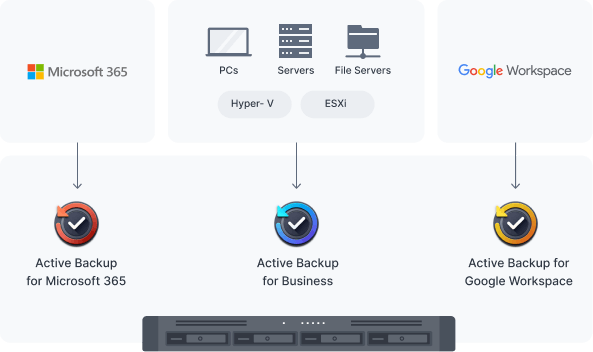
Securely back up Windows and Linux endpoints, Synology servers, and VMware® and Hyper-V® virtual machines with Active Backup for Business.
Microsoft 365 and Google Workspace
Centralize backups of Microsoft 365 and Google Workspace data to protect it from accidents and simplify compliance with data retention policies. Schedulable backups, flexible file versioning, and block-level deduplication ensure flexibility and savings in terms of storage and bandwidth consumption.
Data protection and recovery
Hyper Backup
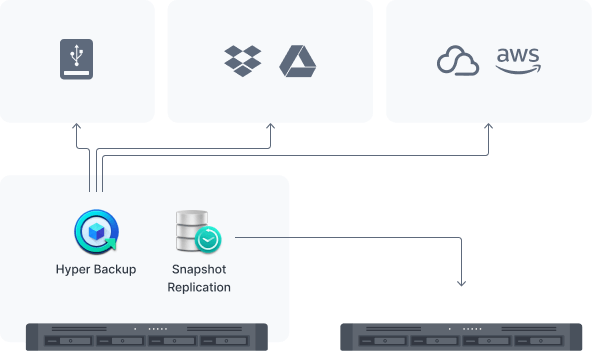
Back up files, LUNs, installed applications, and system configurations to destinations including Synology C2 Storage,6 public cloud platforms, USB devices, file servers, local folders, or other Synology systems.
Set and forget backup tasks with regular schedules, enhance security with fine-grained user permissions and encryption, keep backup sizes small with built-in deduplication, and restore data flexibly with multi-versioning.
Snapshot Replication
Snapshot Replication enables configurable point-in-time snapshots of shared folders and VM storage with an RPO as low as 5 minutes and recovery within seconds.
Simple-to-deploy local surveillance
Wide compatibility
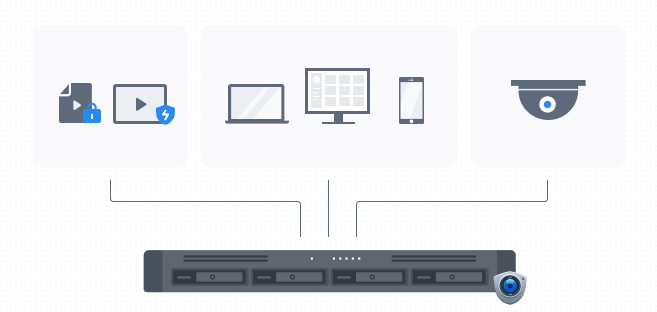
Connect up to 40 IP cameras from a selection of over 8,300 validated models thanks to Synology Surveillance Station’s wide camera compatibility.
Multi-platform convenience
Monitor live streams or watch recordings from web browser, desktop client, or the DS cam mobile app.
Secure and private
Footage is stored locally for easier compliance with data protection regulations and further protected from unauthorized access with industry-standard AES-256 encryption.
Flexible monitoring of multiple locations
Assisted mass deployment
Automatically locate new cameras within a set IP range, and configure units in batch by importing spreadsheets or replicating settings to new cameras.
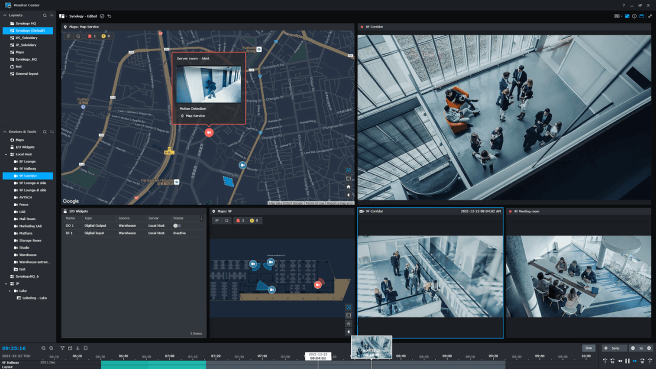
Centralized management and monitoring
Stay on top of your deployment by previewing triggered events directly on multi-floor or multi-location maps, with online map integration for Google Maps and OpenStreetMap.
Video analytics
Take advantage of intelligent monitoring features such as motion detection, no idle zone, foreign object detection, and anomaly detection to cater the most common surveillance scenarios.

File Management
Manage, sync, and share files from multiple devices through a centralized platform.

User Management
Manage user accounts and devices throughout your business with powerful directory services.

Security
Shield your Synology NAS from the most sophisticated threats with industry-leading security solutions.

Central Management System
Conveniently manage your fleet of Synology NAS from a centralized console.

System Administration
Manage the health of your deployments and centrally administer updates with ease.

Synology High Availability
Seamless transition between clustered servers in the event of a server failure to minimize the impact on applications.
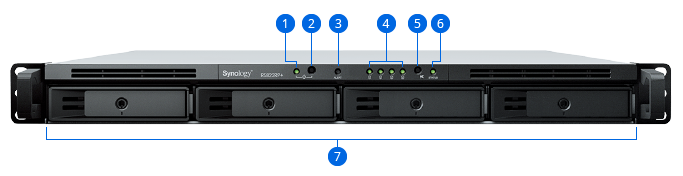
- 1. Power Indicator
- 2. Power Button
- 3. Alert Indicator
- 4. Drive Status Indicators
- 5. Mute Button
- 6. Status Indicator
- 7. Drive Trays
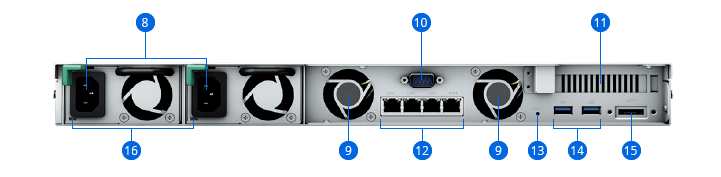
- 8. Power Ports
- 9. Fans
- 10. Console Port
- 11. PCI Express Expansion Slot
- 12. 1GbE RJ-45 Ports
- 13. Reset Button
- 14. USB 3.2 Gen 1 Ports
- 15. eSATA Port
- 16. Redundant Power LEDs




Reviews
There are no reviews yet.